

Make the Most of your Microsoft Teams Call Queue Reporting

Make the Most of your Microsoft Teams Call Queue Reporting - BlueSky UC

Microsoft Teams Call Queue Reporting, powered by Teams PowerPack from Team Venti, gives businesses a comprehensive solution to monitor and analyze their Teams voice call activity and quality. With deep visibility into call performance metrics — including wait times, abandoned calls, per-agent call volumes, call durations, and more — organizations gain the actionable intelligence they need to run high-performing contact center operations.

This Teams phone reporting tool equips business managers with the insights to pinpoint service gaps and continuously improve the customer experience. Beyond the big picture, it enables granular performance tracking at both the individual agent and team level, making it easier to recognize top performers, target coaching efforts, and allocate resources where they matter most.

Furthermore, it enables businesses to monitor individual agent and team performance, facilitating recognition of top achievers, providing additional training where needed, and reallocating resources to boost productivity and overall business performance.

IT teams also benefit directly: faster troubleshooting and issue resolution across networks, devices, and call streams means less downtime and a more reliable communications infrastructure for everyone.

How to use Microsoft Teams Call Queue Reporting

Microsoft Teams call queues dashboard

Call queues offer a structured way of directing callers to the appropriate personnel within your organization who can assist with their specific inquiries or concerns. In this system, incoming calls are systematically distributed to agents, one call at a time.

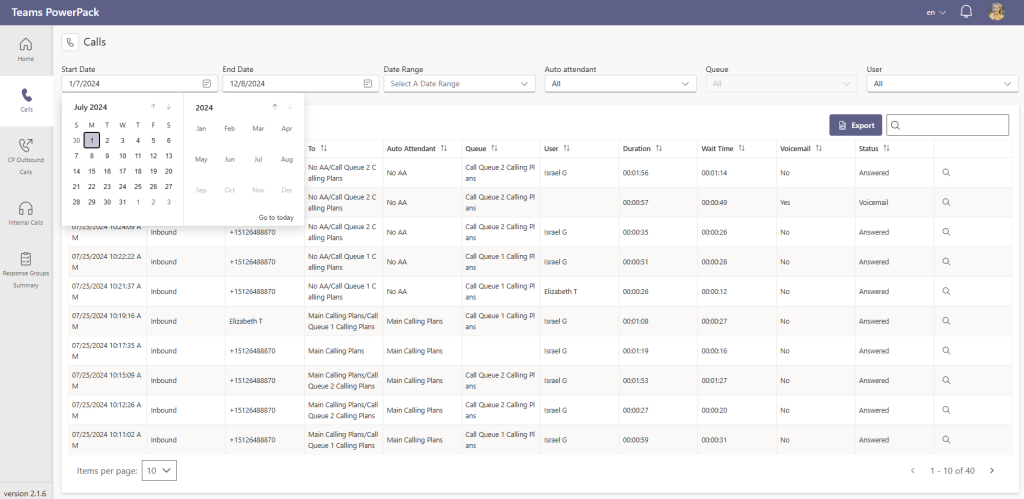
In Teams PowerPack – Call Analytics, business managers can access a dashboard with a comprehensive view of critical information and powerful search and filtering tools to monitor the number of calls answered, unanswered, and those that reached voicemail, all filtered by your Teams Call Queues and Auto Attendants.

teams-call-queue-reporting
Teams PowerPack Filtered by Auto Attendant
teams-call-queue-reporting-tool
Teams PowerPack Reporting Hover View

Detailed Microsoft Teams Call Queue Reports

Within Teams PowerPack – Call Analytics, business managers and IT staff can monitor and analyze historical data in greater detail, including the number of calls in the queue, the average wait time for callers, the number of calls abandoned by customers, call duration, whether the call reached voicemail, and the call’s status. Additionally, they have the ability to export this data to Excel.
teams-power-pack-call-analytics-for-microsoft-teams-filters-environment-

Teams PowerPack by Team Venti

Customer experience tools natively built for Microsoft Teams. Extend your Teams without leaving the Microsoft 365 ecosystem 

Leverage Microsoft Teams Call Queue Reporting

As businesses look for deeper insights from call performance, basic Microsoft Teams call reporting falls short, lacking comprehensive analytics and historical call data.

Teams PowerPack Premium – Call Analytics is an indispensable tool for continuously monitoring your company’s calls. With powerful search and filtering tools, as well as a user-friendly interface, you can stay informed about your call activity and quality. This tool enables business managers and IT staff to analyze calls, track costs, assess resource utilization, generate reports, and make informed decisions based on data. Contact us for a free demo and a 30-day trial.

Originally written by Iovalli Acevedo · Marketing Manager
Mercedes Leon
Updated by Mercedes Leon
March 23, 2026

Sign up to learn more

Get news, updates, and insights about Microsoft solutions, technologies, and best practices.

Share This Story, Choose Your Platform!

Related posts









