

How to identify and mitigate Shadow AI risks in organizations

How to identify and mitigate shadow ai risks in organizations

Table of Contents

Shadow AI is becoming one of the fastest-growing risks inside organizations. As AI-powered apps flood the workplace, many are being adopted without IT approval or oversight. This form of Shadow IT now includes tools capable of generating content, processing data, and even making business decisions, all while operating outside official channels.

In this article, we will explore what Shadow AI is, how to detect it using heat maps from Microsoft Defender for Cloud Apps and Entra ID, and what steps IT leaders can take to reduce exposure across the business.

What is Shadow AI?

Shadow AI refers to the use of artificial intelligence tools in an organization without explicit approval or governance from the IT department. These tools might be used for writing, coding, designing, summarizing meetings, or analyzing data.

Unlike traditional Shadow IT, which involved cloud storage or productivity apps, Shadow AI can pose much greater risks. AI tools can quietly handle large volumes of sensitive data, store user inputs, and even learn from that data, raising significant concerns around compliance, intellectual property, and data protection.

Why Shadow AI is a problem for organizations

Shadow AI impacts your organization in several ways:

  • Security risk: Data shared with unsanctioned tools may be exposed to external servers with unknown protections

  • Compliance issues: Many AI tools don’t meet regulatory requirements for HIPAA, PCI-DSS, or FDIC compliance

  • Redundant spending: Departments may be paying for tools that duplicate existing enterprise capabilities

  • Visibility gaps: Without proper monitoring, it’s difficult to assess where and how data is being processed

These risks are compounded by how easy it is to adopt AI tools. Employees can now start using new applications with a simple login or API connection.

Microsoft Cloud Security Services

Protect your company’s information without compromising end-user productivity. For cloud and on-premises environments

Using heat maps to detect Shadow AI

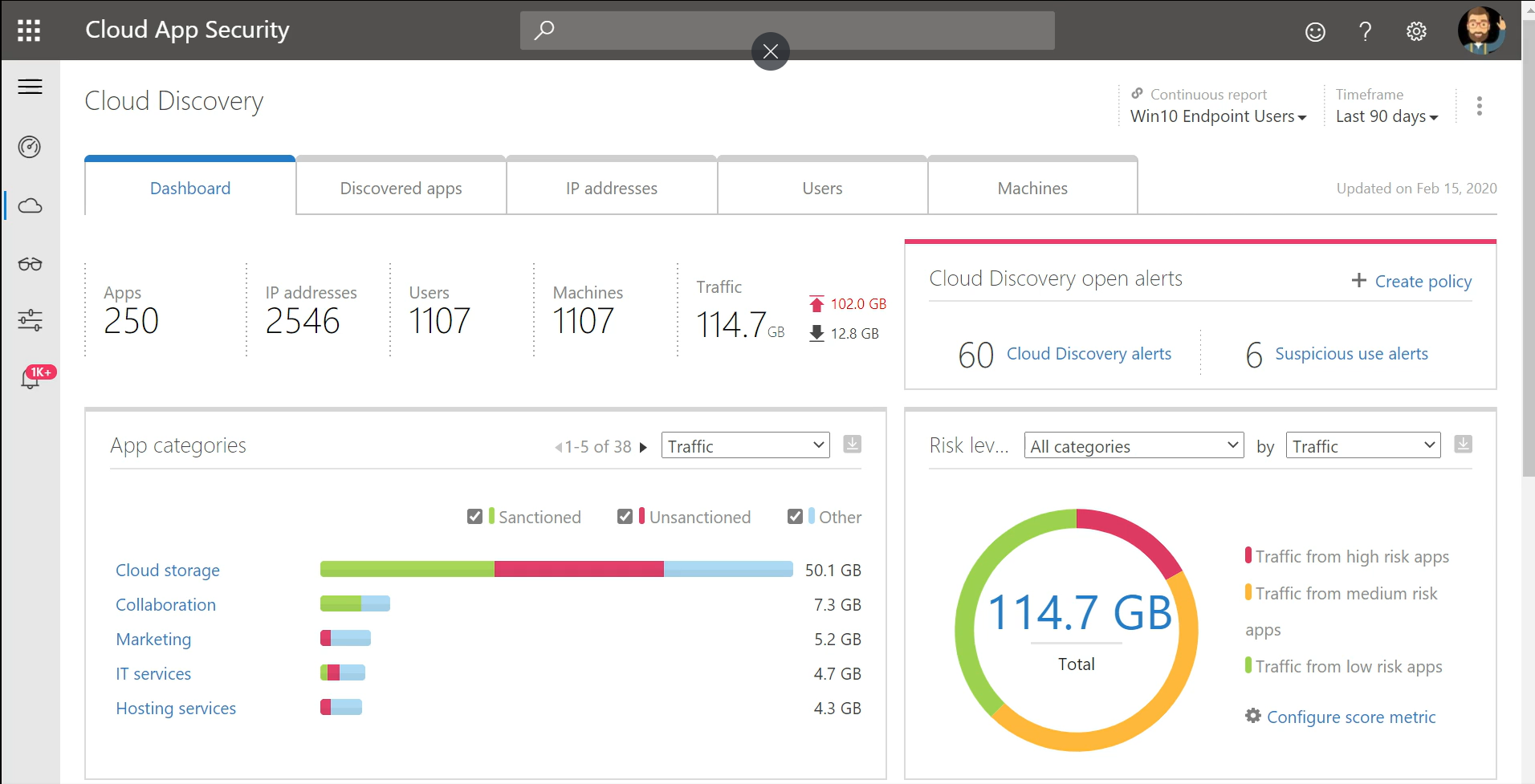
Microsoft Defender for Cloud Apps and Entra ID can generate heat maps that reveal app usage across your environment. These tools help IT teams identify unsanctioned applications, including AI platforms that handle sensitive tasks.
microsoft cloud app security
Source: Microsoft

Heat maps allow you to:

  • Identify usage patterns that indicate Shadow AI

  • See which applications are accessing corporate data

  • Detect high-risk behaviors and unusual spikes in app activity

  • Understand whether users are bypassing security policies

Because these insights are updated in real time, you can respond before issues escalate.


How to mitigate Shadow AI risks

Here’s a practical framework to begin mitigating risk:

1. Turn on Defender for Cloud Apps

Enable app discovery across your network to surface usage trends. This includes sanctioned and unsanctioned apps, especially those with AI capabilities.

2. Leverage Entra ID

Tie user identity to app usage. This helps uncover who is using what, how sessions are secured, and where data might be leaving your environment.

3. Analyze your heat map regularly

Review high-use applications and flag any tools that fall outside compliance or security policies.

4. Define a clear app policy

Set and communicate policies for acceptable AI tool usage, including review processes and guidelines for requesting new apps.

5. Engage your teams

Let employees know why Shadow AI is a concern and how governance protects their work, not just restricts it.

Partner with Team Venti to reduce your risk

At Team Venti, we help organizations uncover and manage Shadow AI using Microsoft’s security tools and proven strategies. From app discovery to policy creation, our team equips IT leaders with the visibility and control they need.

Let’s protect your data, reduce unnecessary costs, and help your teams use AI tools safely.

Iovalli Acevedo
Written by Iovalli Acevedo Marketing Manager
July 14, 2025

Sign up to learn more

Get news, updates, and insights about Microsoft solutions, technologies, and best practices.

Share This Story, Choose Your Platform!

Related posts









