

Keep Your Organization Secure: How to Prevent a Phishing Attack
In recent weeks, users on Reddit have reported receiving spam/phishing emails that appear to be from DocuSign about signing NDAs. If you have received similar kinds of emails, you might be a target for phishing attacks.
Table of Contents
As of 2026, 3.4 billion phishing emails are sent each day, most generated by AI. These emails are designed to look like they come from trusted sources including your colleagues, IT department, or common services like Microsoft and HR to trick you into sharing passwords or downloading harmful software. With 90% of cyberattacks starting with phishing, it is crucial to understand how they work and how to keep your organization protected.
What is Phishing?
Phishing is a form of criminal social engineering where attackers masquerade as trusted entities to steal sensitive information like usernames, passwords, and credit card details, usually through fraudulent bulk emails. These attacks, which bypass spam filters, aim to lure users into clicking malicious links or opening attachments.
Key Phishing Elements:
Phishing is highly effective, with an estimated 90% to 91% of successful cyberattacks starting with a phishing email. While, overall, about 17.8% of users click on malicious links, specific, targeted phishing attacks (spear-phishing) have much higher success rates, with some campaigns resulting in over 50% click rates.
RED FLAGS: Suspicious domains, urgent requests, and unexpected messages.
- Urgency/Fear Tactics: Emails claiming your account will be deleted or you’re in trouble.
- Suspicious Sender Address: Check if the name matches the actual email address.
- Generic Greetings: “Dear Customer” or “Dear Employee” instead of a name.
- Unexpected Links/Attachments: Never click links or open attachments you didn’t ask for.
- Hover Before Clicking: Hover your mouse over a link to see the real destination URL.
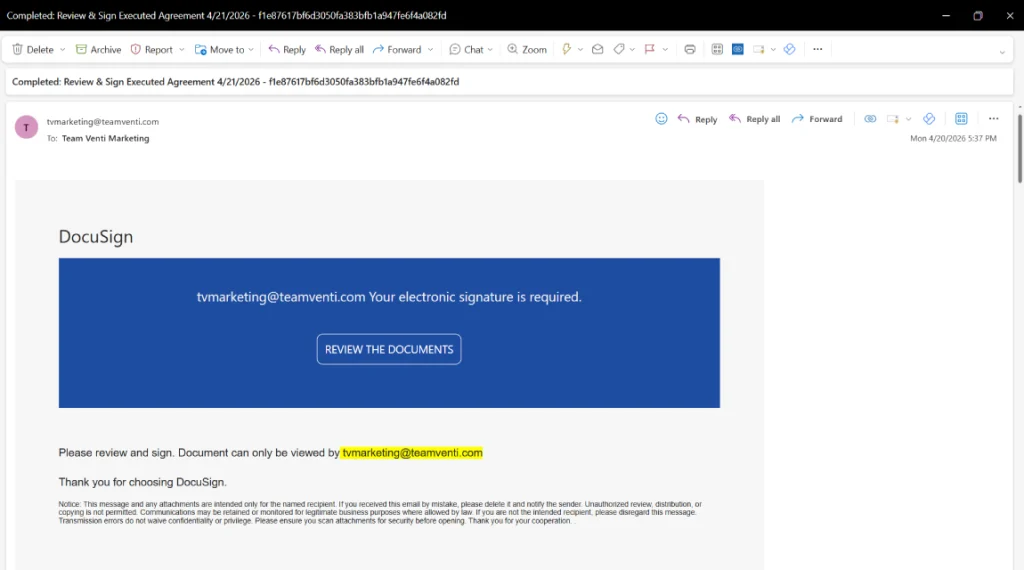
At Team Venti, we’re not immune to phishing threats, recently we’ve received emails claiming to be from DocuSign, requesting an electronic signature. Here is an example of what a phishing email might look like.

Microsoft Cloud Security Services
Protect your company’s information without compromising end-user productivity. For cloud and on-premises environments
How to Prevent a Phishing Attack?
Digital security is a shared responsibility between every user involved with sensitive information. Here are seven essential actionable tips to prevent phishing attacks:
- Pause: Take 3 seconds to analyze an email before clicking, as this stops most attacks.
- Urgent or Threatening Language: Be wary of emails that demand “immediate action” or threaten to “suspend your account.”
- Verify Independently: If a message requests sensitive info, look up the company/person and contact them directly instead of replying.
- Password Hygiene: Never share your password, even if the email looks like IT support.
- Suspicious Senders: Always double-check the sender’s email address. Scammers often use addresses that look almost identical to real ones (e.g., @company-support.com instead of @company.com).
- Unexpected Attachments or Links: Never click a link or download a file you weren’t expecting, even if it looks like an invoice or a “bonus” notification.
- Report Immediately: Report suspicious emails to your IT department or manager immediately
The “STOP” Framework
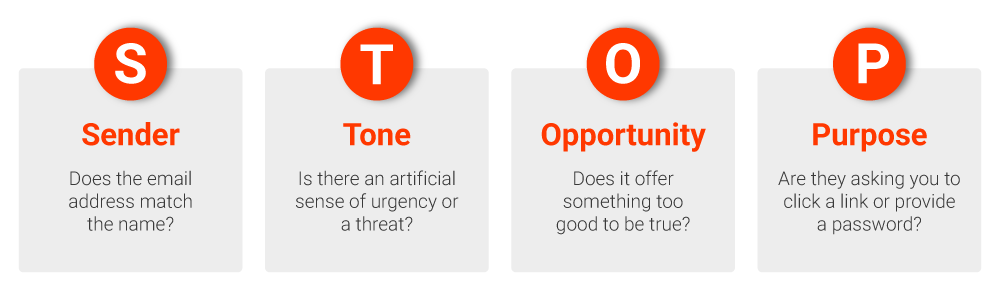
Use this simple acronym to help employees pause before acting on any email:
- S – Sender: Does the email address match the name? Look for typos (e.g., support@micros0ft.com vs microsoft.com).
- T – Tone: Is there an artificial sense of urgency or a threat? (e.g., “Account suspended,” “Immediate action required”).
- O – Opportunity: Does it offer something too good to be true, like an unexpected bonus or a gift card?
- P – Purpose: Are they asking you to click a link, download an attachment, or provide a password?

Teams PowerPack by Team Venti
Customer experience tools natively built for Microsoft Teams. Extend your Teams without leaving the Microsoft 365 ecosystem
What is Spoofing?
Spoofing is a cybercriminal tactic used in phishing attacks where attackers disguise themselves as a trusted person, company, or system—like your boss, IT department, or bank—using fake email addresses, phone numbers, or websites to steal data, money, or passwords. It is a form of digital impersonation meant to create false trust and urgency, often leading to phishing or malware attacks.
Common Types:
- Email Spoofing: Emails appearing from trusted colleagues or executives, often asking for urgent money transfers (wire fraud) or login credentials.
- Caller ID Spoofing: A phone call that shows the company’s real, internal number, but it is a scammer.
- Website Spoofing: A fake website that looks exactly like your company login page to steal credentials.
- Text (SMS) Spoofing: Also known as “smishing,” these texts look like package delivery alerts or security warnings to trick you into clicking a malicious link
Red Flags: Mismatching emails, urgency & secrecy, unexpected links, subtle misspellings.
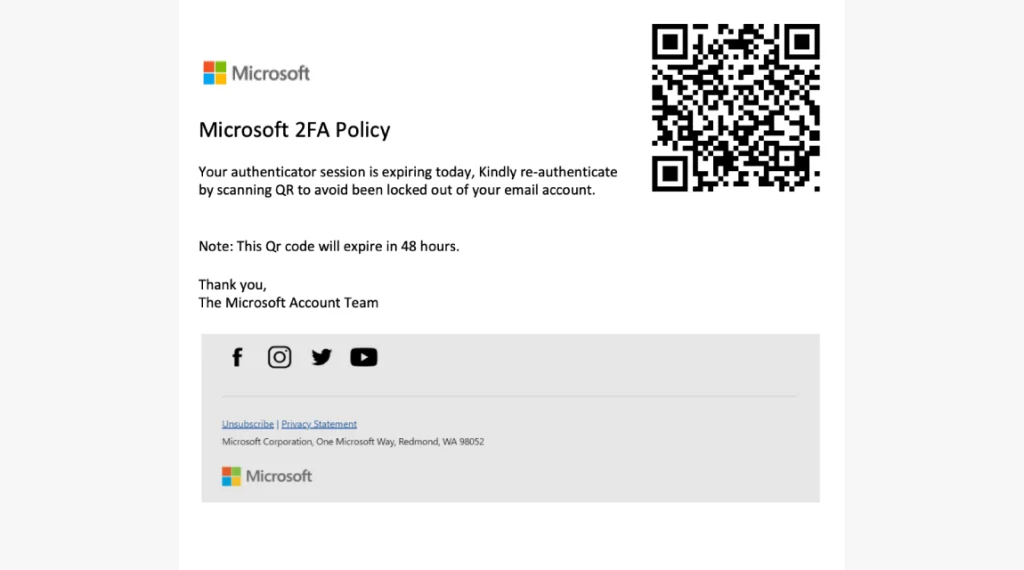
Spoofing emails can be more difficult to identify, here is an example of a spoofing email that appears to have been sent by someone within our company, Charlie Ramirez. Scanning QR codes or clicking in suspicious links could be the start of a cyberattack.
How to Prevent Spoofing Attacks?
- Verify Everything: If an email or call seems urgent or strange, use a separate method of communication to confirm it with the person directly.
- Don’t Reply to Suspicious Requests: Do not respond, click links, or open attachments in suspicious emails.
- Report Suspicious Activity: Encourage employees to report all suspected spoofing to IT immediately.
- Check the URL: Hover over links in emails to see the actual website address before clicking.
Cybersecurity Self-Assessment from a leading Microsoft Solutions partner
Quick Microsoft cloud security check — answer 8 yes/no questions to get instant feedback and a recommendations PDF.
Phishing and spoofing are still the main gateways to cyberattacks. Learning how to prevent a phishing attack, using the STOP framework and proactive prevention habits, your organization can drastically reduce risks. Empower every employee to report suspicious activity immediately and foster a culture of caution.
Security is a team effort; Team Venti can help you with ongoing licensing support, Microsoft Secure score review and recommendations. Subscribe to our managed admin support plan for a security assessment of your environment.

Written by Enrique Cortinas Social Media Manager
April 29, 2026
Sign up to learn more
Get news, updates, and insights about Microsoft solutions, technologies, and best practices.
Share This Story, Choose Your Platform!
Related posts


Cybersecurity Self-Assessment
Answer 8 yes/no questions and receive a cybersecurity recommendations PDF.
Recent Posts









