

Choose the Right Call Analytics Solution: Microsoft Teams Call Reporting Power BI vs Teams PowerPack
Call analytics is a crucial aspect of any business that relies on calls for its daily tasks. This practice provides valuable insights into call activity and performance, thereby contributing to the enhancement of customer service and overall business performance. However, while Microsoft Teams undoubtedly offers a robust collaboration platform, its built-in call analytics features have inherent limitations when it comes to in-depth analysis. Recognizing the need for more comprehensive insights, the utilization of specialized call analytics tools such as Microsoft Teams Call Reporting Power BI or Teams PowerPack – Call Analytics becomes imperative.
These tools extend beyond the native capabilities of Microsoft Teams, providing enhanced analytics, customizable reporting, and a deeper understanding of communication dynamics. By leveraging the capabilities of Teams PowerPack or Power BI, organizations can elevate their understanding of call data, enabling them to make informed, data-driven decisions, optimize communication strategies, and ultimately enhance team productivity.
Key features to look for in a call Analytics tool
When searching for the ideal call analytics tool tailored for Microsoft Teams, it’s essential to prioritize features that align with the unique needs of your business. Here’s a checklist of key features that should be at the forefront of your considerations:
- Integration with Microsoft Teams: Ensure that the analytics tool effortlessly integrates with Teams, enabling a cohesive and unified user experience without the need for additional complex setups.
- Advanced Analytics and Insights: These insights empower you to make strategic decisions based on a deeper understanding of your team’s interactions.
- Scalability: As your business grows, the tool should be able to scale seamlessly to accommodate increased call volumes and evolving analytics requirements.

Teams PowerPack by Team Venti
Customer experience tools natively built for Microsoft Teams. Extend your Teams without leaving the Microsoft 365 ecosystem
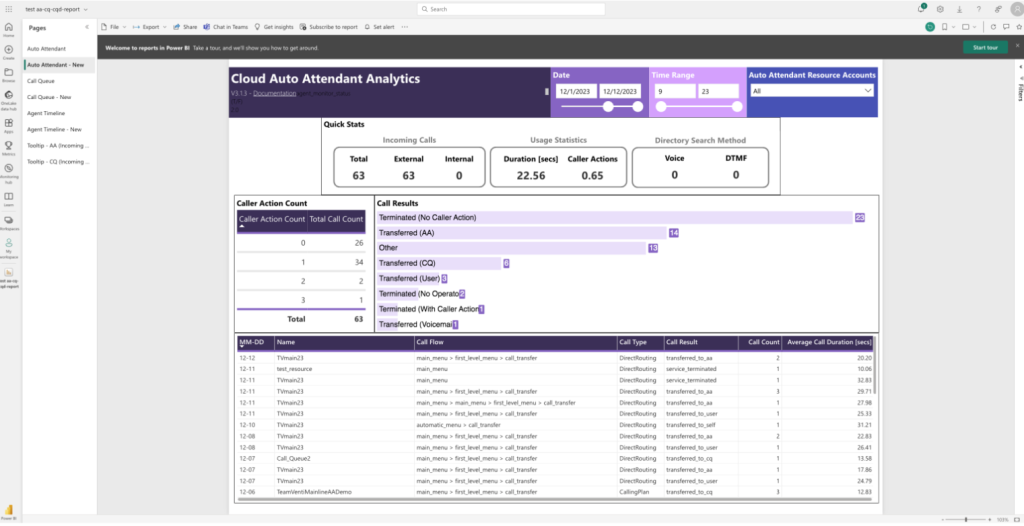
Understanding Microsoft Teams call reporting with Power BI
Power BI offers a wide range of features and capabilities that make it an ideal tool for analyzing call data. Some of the key features of Power BI include:
- Data Visualization: Interactive visualizations that make it easy to understand complex data. You can use a variety of charts, graphs, and other visualizations to explore your call data and identify trends.
- Data Modeling: Organize and structure your data. You can use these models to create relationships between different data sets and perform complex calculations.
- Data Analysis: Identify patterns, trends, and outliers in your data.
- Data Sharing: Reports and dashboards can be accessed by anyone in your organization, making it easy to collaborate and share insights.
Power BI can help you gain a wide range of insights into your call data. Some of the types of insights that you can gain through Power BI analytics include:
- Call Volume
- Call Quality
- Call Duration
- Caller Demographics
Exploring Teams PowerPack – Call Analytics
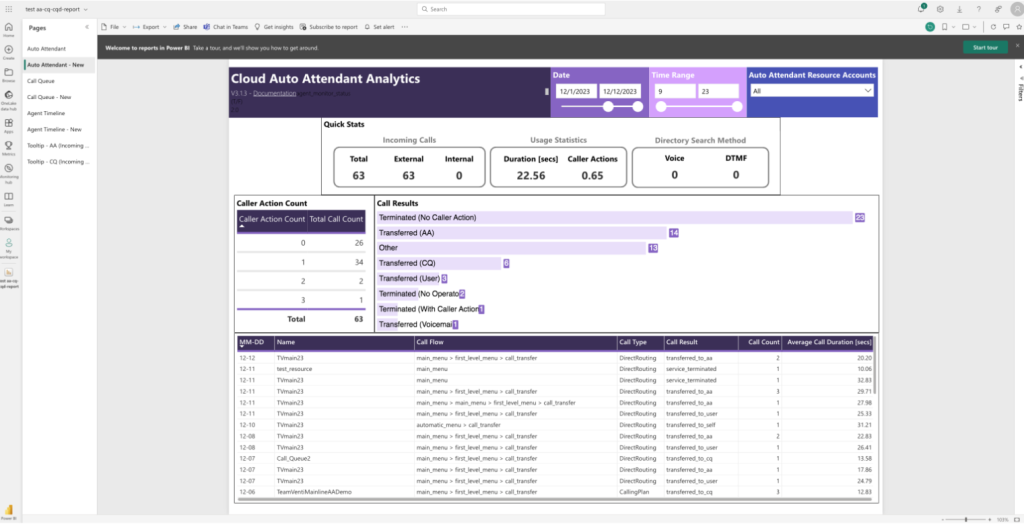
Teams PowerPack – Call Analytics is an alternative platform for call analytics and reporting that can be used in conjunction with Microsoft Teams Call Reporting. It offers a range of unique features and functionalities that make it an ideal tool for analyzing call data.
- User-friendly interface: Quickly access call data and insights through a single pane of glass.
- Native reporting of Teams data: Provides native reporting of your Teams data, giving you visibility into business metrics and technical performance data.
- Powerful search and filtering tools: Powerful search and filtering tools that allow you to quickly access the data and insights you need.
- Quick access to data and insights: Rapidly identify trends, anomalies, and opportunities for improvement.
- Global time zone support: Comprehensive support for over 200 time zones, ensuring accurate analysis of call data across different geographic regions.
Advantages and specific use cases of Teams PowerPack – Call Analytics
- Better visibility: Comprehensive visibility into call activity and quality, allowing you to make informed decisions based on data.
- Easy deployment and usage: Designed for effortless setup and maximum benefits without extensive training or complex configurations.
- Quick data access: Monitor call performance and quality in one place, providing quick access to data and insights.
- Enhanced customer service and expedited troubleshooting: With detailed analytics you can respond promptly to customer inquiries, address issues proactively, and streamline troubleshooting processes. This results in higher customer satisfaction, reduced resolution times, and an overall improvement in the efficiency of customer support operations.
- Call flow analysis: Detailed analysis of call flows, including what happens when a call is transferred or escalated to another agent. This helps identify potential bottlenecks and areas for improvement in the call handling process.
Choosing the right solution
When faced with the decision between Power BI and Teams PowerPack for call analytics and reporting, it’s essential to consider various factors to align the chosen solution with your organization’s unique needs. Here, we provide guidance on key considerations and offer a decision-making framework to facilitate a well-informed choice.
| Function | Power BI | Teams PowerPack |
|---|---|---|
| Analytical requirements | If your organization seeks a comprehensive analytics platform with broad capabilities beyond call data, Power BI may be the preferred choice. It excels in providing a holistic view of organizational data. | For specialized and in-depth call analytics with a focus on Microsoft Teams, Teams PowerPack offers tailored features and functionalities specifically designed for communication insights. |
| Integration with Microsoft Teams | Yes | Yes |
| Date/hours filter | Yes | Yes |
| Detailed call information | No | Yes |
| Detailed flow call | No | Yes |
| Caller ID number | No | Yes |
| Consolidated reports | No | Yes |
| Reports at a glance | No | Yes |
| Easy search function | No | Yes |
| Free licensing | Yes Limited by one user* | 15-day Free Trial with all the capabilities |
*Each user who needs to access and view reports will require a separate license.
Decision-making framework
- Identify organizational needs:
Evaluate your organization’s specific requirements for call analytics, considering the depth of analysis needed and the platforms where the analytics tool will be applied.
- Budget allocation:
Assess your budget constraints and allocate resources based on the importance of comprehensive analytics versus a more specialized, Teams-centric approach.
- Trial and user feedback:
Consider running trials for both Power BI and Teams PowerPack Premium. Gather feedback from end-users to understand which platform aligns better with their workflow and reporting preferences.
- Scalability:
Anticipate future growth and assess the scalability of each solution. Choose a tool that can adapt to your organization’s evolving communication needs.
By carefully weighing these factors and applying the decision-making framework, organizations can confidently choose between Power BI and Teams PowerPack – Call Analytics, ensuring that the selected solution aligns seamlessly with their unique goals and requirements.
If you want to explore Teams PowerPack Premium further or require additional guidance, our team of experts and specialists is here to assist you. Contact us for personalized support in navigating the features and benefits of Teams PowerPack – Call Analytics to make an informed decision that best suits your organization’s goals and requirements. By carefully weighing these factors with expert assistance, organizations can ensure that the selected solution aligns seamlessly with their unique needs.
Originally written by Juan Dominguez · UC & I/F Engineer

Updated by Mercedes Leon
April 13, 2026
Sign up to learn more
Get news, updates, and insights about Microsoft solutions, technologies, and best practices.
Share This Story, Choose Your Platform!
Related posts


Leverage the Power of Power Platform
Streamline workflows and automate insights in an integrated environment with Power Apps, Power BI, and Power Automate
Recent Posts









