Seamless analytics and reporting
- Core reporting: Gain insights into call activity within a specified timeframe. Identify trends, track performance metrics, and make informed decisions.
- Call details on demand: Supervisors can delve deeper with “Calls X-Ray,” visualizing the call flow step-by-step for informed decision-making and troubleshooting.
- Within the Call X-Ray report, a new modal now displays the Active Agents who were part of the call’s designated Skill at the precise moment the system initiated the search for agents.
- The report also now identifies Agents who were offered the call but did not answer, along with their status at the exact time of the incoming ring.

Enhanced visibility with wallboards
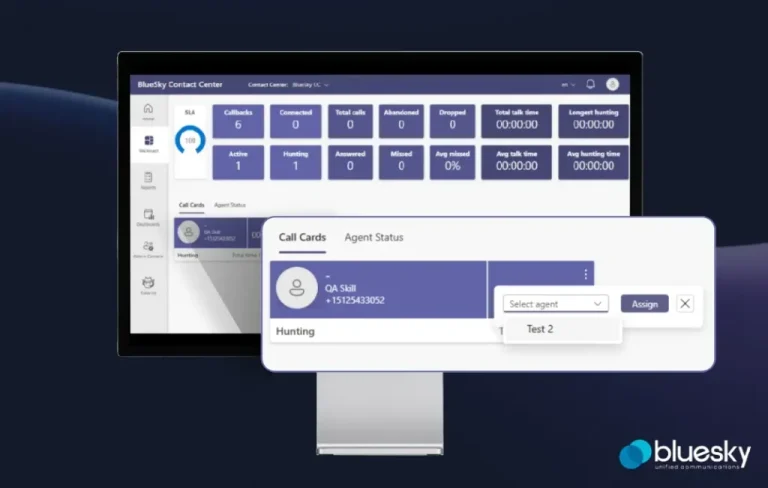
- Actionable insights at a glance: The Live Call Wallboard keeps supervisors informed about call volume, agent availability, and key performance indicators (KPIs). This empowers them to make real-time adjustments to optimize call flow and agent utilization.
- Supervisors and Administrators can now directly assign ringing calls to any Agent within the same skill, regardless of the agent’s current presence or opt-in status. The assigned call will automatically begin ringing on the agent’s device once their current activity is complete.
- Agents now have the ability to assign ringing calls to themselves directly from the Wallboard.
- Actionable insights at a glance: The Live Call Wallboard keeps supervisors informed about call volume, agent availability, and key performance indicators (KPIs). This empowers them to make real-time adjustments to optimize call flow and agent utilization.
Additional benefits of a Teams native solution
- Streamlined integration: Enjoy a seamless user experience within the familiar Microsoft Teams environment. No need for additional installations or complex integrations.